
Ten hours. That is a full working day — every single week. It sounds ambitious, almost too good to be true. But the research is in, and the numbers are hard to argue with.

A landmark study by the Federal Reserve Bank of St. Louis found that workers who actively use generative AI save an average of 5.4% of their working hours — roughly 2.2 hours per week for a standard 40-hour schedule. Among the most frequent users, that figure climbs dramatically: 20.5% of regular AI users reported saving four or more hours per week, and 27% of heavy users reclaim more than nine hours weekly. A small but growing cohort of what researchers call “superusers” report reclaiming 20 or more hours per week.
The question is not whether AI can save you time. The science has answered that. The question is: are you using it strategically enough to get to 10 hours?
This guide will show you exactly how.
Why Most People Are Leaving Hours on the Table
Before diving into tactics, it is worth understanding why the average worker is still only scratching the surface of AI’s potential.
By August 2025, over half of working-age adults in the United States had used generative AI — a significant jump from just a year earlier, according to the Real-Time Population Survey. Yet despite this surge in adoption, most people are using AI for isolated, ad-hoc tasks: asking it a question here, generating a paragraph there. That is the equivalent of owning a high-performance car and only driving it in first gear. As we explored in our John Keells Holdings (JKH) digital transformation case study, the workers saving 10+ hours per week are not doing something magical. They have simply identified the most time-hungry recurring tasks in their workflow and systematically delegated them to AI. They have also learned where AI excels and where it falls short — what Harvard Business School researchers famously called the “jagged technological frontier.”
This distinction was clearly quantified in a landmark study conducted by researchers from Harvard Business School, MIT Sloan, Wharton, and the Boston Consulting Group. By testing 758 professional consultants on 18 realistic knowledge work tasks, they revealed the profound baseline impact that strategic AI integration has on daily performance:
| Performance Metric | Impact with AI Assistance |
| Task Completion Volume | +12.2% more tasks completed |
| Speed & Efficiency | 25.1% faster task completion |
| Output Quality | +40% higher quality ratings |
| Skill Leveling (Junior Consultants) | +43% improvement in overall performance |
The lesson here is clear: AI does not just speed you up. Used well, it fundamentally elevates the standard of your output while costing you significantly less time.
The Five Categories Where AI Saves the Most Time
To consistently reclaim 10 hours per week, you need to target the right tasks. Research consistently shows that AI delivers the highest time savings in five core areas.
1. Writing and Communication (Save 2–4 Hours Per Week)
Email, reports, proposals, meeting summaries, social media posts, internal memos — writing is the single biggest time drain for most knowledge workers. And it is also where AI delivers its most dramatic results.
An MIT study published in the journal Science tested 444 college-educated professionals on realistic writing tasks — drafting press releases, writing short reports, analysing plans, and composing difficult emails. Participants using AI completed these tasks 54% faster while improving quality scores by 27%.
A study by Anthropic found that AI users save 87% of the time it would take to write invoices, memos, and other professional documents.
How to get there:
- Draft every email over 100 words with AI first, then edit. Stop writing from a blank page.
- Use AI to turn rough bullet points into polished reports.
- Have AI summarise long email threads before you reply.
- Generate first drafts of weekly updates, project summaries, and performance reviews.
Most professionals who do this consistently report saving at least 45–90 minutes per day on writing alone.
2. Research and Information Synthesis (Save 2–3 Hours Per Week)
Finding information, reading through long documents, synthesising multiple sources, and extracting key insights — this kind of research work used to take hours. AI compresses it dramatically.
Consider this: Anthropic’s productivity research found that users complete curriculum development and research synthesis tasks in as little as 11 minutes — tasks that would typically take a professional 4.5 hours unassisted. That is a 96% reduction in time for that specific task type.
How to get there:
- Feed long PDFs, reports, and articles into AI tools and ask for structured summaries with key takeaways.
- Instead of searching through multiple tabs to answer a question, ask AI to synthesise the answer first and point you to sources.
- Use AI to compare options, analyse competitors, or summarise industry trends before a meeting.
- Ask AI to extract action items and decisions from meeting transcripts.
For anyone who spends significant time reading and synthesising information — researchers, marketers, consultants, managers — this is where the biggest gains live.
3. Data Analysis and Reporting (Save 1–3 Hours Per Week)
You do not need to be a data scientist to benefit here. AI tools can now generate charts, write formulas, clean spreadsheets, flag anomalies, and produce narrative summaries of data — tasks that used to require either specialist skills or painful manual effort.
In customer support, a large-scale experiment involving 5,000 agents found that access to an AI assistant increased the number of issues resolved per hour by 14%, according to research cited by SmartBrief. The gains were largest among newer employees, suggesting that AI effectively transfers institutional knowledge that would otherwise take years to accumulate.
How to get there:
- Use AI to write Excel and Google Sheets formulas you would normally have to look up or manually calculate.
- Generate automated summaries of weekly performance data.
- Ask AI to identify patterns or anomalies in datasets you share with it.
- Use AI to build first-draft dashboards or reports you then refine.
4. Planning, Brainstorming, and Strategy (Save 1–2 Hours Per Week)
One of the most underused applications of AI is as a thinking partner. Before a big meeting, a new project, or a difficult decision, using AI to stress-test your thinking, generate alternatives, and challenge assumptions can dramatically reduce the time you spend going in circles.
The Harvard/BCG study found particularly strong gains in creative and analytical tasks — developing product ideas, analysing brand performance, building strategic frameworks. These are tasks that knowledge workers often find themselves procrastinating on, staring at a blank document for an hour before anything useful emerges. AI eliminates that friction.
How to get there:
- Before any strategic meeting, ask AI to generate five alternative approaches to the problem you are solving.
- Use AI to create project plans, agendas, and frameworks from a few bullet points.
- Ask AI to play devil’s advocate on a plan before you present it.
- Use it to rapidly prototype ideas — pitch decks, campaign concepts, product features — before investing significant time in them.
5. Administrative and Repetitive Tasks (Save 1–2 Hours Per Week)
Calendar management, scheduling, creating templates, reformatting documents, writing standard operating procedures, answering routine questions — these are the tasks that individually feel trivial but collectively consume enormous amounts of time.
Microsoft’s internal research on Copilot users found an average saving of 11 minutes per day on administrative tasks alone. That may sound modest, but across a month it adds up to nearly an hour per week from a single, narrow category.
How to get there:
- Build AI-generated templates for recurring documents — weekly updates, project briefs, client proposals.
- Use AI to draft standard replies to common questions you receive repeatedly.
- Ask AI to create standard operating procedures from your own descriptions of how you do things.
- Use AI to reformat, reorganise, or condense documents instead of doing it manually.
A Realistic 10-Hour Weekly Plan
Here is what saving 10 hours per week actually looks like broken down by day, based on the task categories above.
Monday (Save ~2 hours) Start the week by using AI to draft your weekly plan, priority list, and any Monday morning communications. Instead of writing each from scratch, generate drafts in under 10 minutes and edit them. Use AI to summarise the emails and messages that piled up over the weekend.
Tuesday and Wednesday (Save ~3 hours across both days) These are typically your deepest work days. Use AI to handle all first-draft writing — reports, analysis summaries, proposals. Every time you find yourself opening a blank document, open AI first and generate a starting structure. Also use AI during preparation for any meetings: have it generate agendas, background research, or relevant data summaries in advance.
Thursday (Save ~2 hours) Thursday is often reporting day. Use AI to generate first drafts of status updates, performance summaries, and internal reports. Feed your data into AI tools and ask for narrative summaries rather than building them manually from scratch.
Friday (Save ~3 hours) End-of-week wrap-up is one of the biggest time sinks in a knowledge worker’s week. Use AI to draft your weekly summary, plan next week’s priorities, generate any follow-up emails from the week’s meetings, and handle any outstanding administrative tasks. Most people spend 2–3 hours on this naturally. With AI, it takes under 30 minutes.
The Tools You Need
You do not need a complex or expensive setup. The workers achieving the highest time savings are typically using two or three tools consistently rather than constantly switching between many.
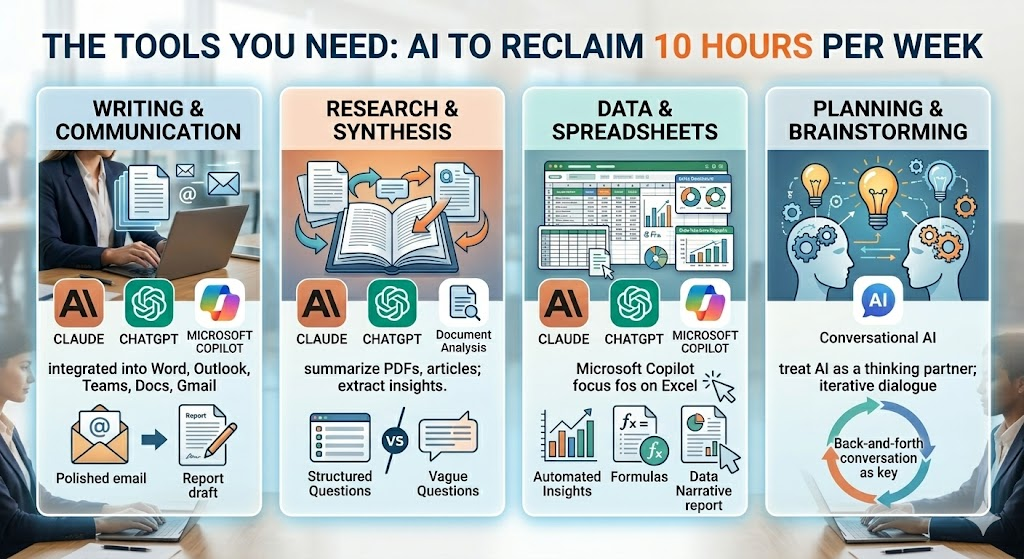
For writing and communication: Claude, ChatGPT, or Microsoft Copilot integrated into your existing email and document tools. If you use Microsoft 365, Copilot is embedded directly into Word, Outlook, and Teams. If you use Google Workspace, Gemini is integrated into Docs and Gmail.
For research and synthesis: Any of the major large language models handle document summarisation and research synthesis well. The key is learning to upload documents directly and ask specific, structured questions rather than vague ones.
For data and spreadsheets: Claude and ChatGPT both handle data analysis effectively when you paste in data or upload files. Microsoft Copilot in Excel is particularly powerful for formula generation and data narrative.
For planning and brainstorming: Any conversational AI tool works here. The skill is learning to treat AI as a thinking partner rather than a search engine — having a back-and-forth conversation rather than a one-shot query.
The Habits That Separate 2-Hour Savers from 10-Hour Savers
The research is clear that time savings from AI vary enormously between users. The Federal Reserve found that among workers who used generative AI, average savings were 5.4% of work hours. But frequent users saved far more — with the top tier reclaiming 20+ hours per week.
What separates these groups is not access to better tools. It is habits.
Habit 1: Never start from a blank page. The single most powerful shift you can make is committing to always use AI to generate a starting structure before you begin writing anything. The blank-page problem — the procrastination, the circling, the false starts — disappears almost entirely.
Habit 2: Batch your AI tasks. Rather than switching in and out of AI tools throughout the day, set specific times to work through a batch of tasks together. This reduces cognitive switching costs and builds fluency.
Habit 3: Iterate, do not accept first drafts. The biggest mistake new AI users make is accepting the first output without refinement. The workers producing the highest quality results are those who treat AI output as a strong first draft and then apply their own judgment, context, and expertise. The Harvard/BCG study found that consultants who used AI as a collaborator — editing and refining outputs — produced significantly better results than those who simply submitted AI-generated content unchanged.
Habit 4: Learn the boundaries. The same Harvard study that found such dramatic productivity gains also found that consultants using AI on tasks outside its competency were 19% less likely to produce correct results than those working without AI. AI is extraordinarily powerful for writing, synthesis, ideation, and structured analysis. It is less reliable for tasks requiring deep contextual judgment, real-time data, or highly specialised expertise. Knowing the difference is the difference between being a power user and being misled.
Habit 5: Build your prompt library. The most productive AI users maintain a personal collection of prompts that work well for their most common tasks. Instead of figuring out how to ask the same type of question repeatedly, they have refined prompts they can deploy instantly.
What the Numbers Really Mean for You
Let us put this in concrete terms.
If you earn $60,000 per year, your time is worth approximately $30 per hour. Saving 10 hours per week represents $300 per week in time value — $15,000 per year. At $100,000 per year, that becomes $25,000 annually.
However, the value calculation goes beyond hourly rates. The Harvard Business School study found AI users completed tasks 25.1% faster with 40%+ higher quality. That means you are not just doing the same work faster — you are producing better work in less time. For anyone whose career depends on the quality of their outputs, that compounding quality improvement may matter even more than the time savings.
About half of employees using generative AI save at least five hours a week, and nearly two-thirds of leaders say they are starting to redesign their organisations around it. The organisations winning the next decade are not simply giving their employees AI tools. They are fundamentally rethinking how work gets done.
The question is whether you will be part of that redesign or whether you will still be doing manually in 2027 what your competitors are doing in minutes today.
Getting Started: Your First Week
If you are starting from zero, here is the simplest possible path to your first 10 hours saved.
Day 1: Sign up for Claude or ChatGPT if you have not already. Write your next report or long email using AI as a first draft. Time yourself. Compare it to how long it would normally take.
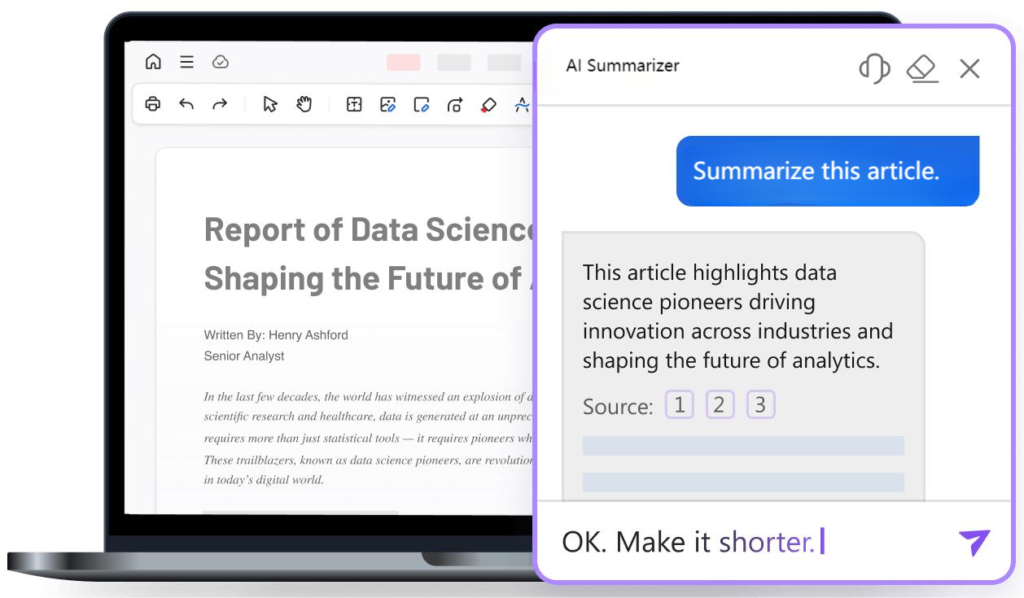
Days 2–3: Use AI to summarise the three longest documents or email threads on your plate. Notice how much time this saves compared to reading them in full.
Days 4–5: Before your next planning meeting, spend 10 minutes generating an agenda, background research, and three strategic questions using AI. Bring that preparation into the room.
End of week: Review how much time you saved. Most people who do this seriously for one week are genuinely surprised by the result — and it changes their relationship with the tools permanently.
Figure 03: A step-by-step blueprint for a professional’s first week implementing strategic AI habits to optimize daily workflow and reclaim lost hours.
The first week is the hardest. The habits feel unfamiliar, the prompts need refinement, and the outputs sometimes miss the mark. Push through that initial friction. The compounding returns begin almost immediately.
Ten hours a week is not a promise. It is a target — one that the research shows is achievable, and one that a growing number of knowledge workers are already hitting. The only real question is when you will start.
Enjoyed this article?
Stay connected for more insights on business strategy, marketing, innovation, and digital transformation.
Follow us on LinkedIn for professional discussions and industry updates.
Follow us on Instagram for business tips, behind-the-scenes content, and inspiration.
Follow us on Facebook for in-depth discussions, articles, and updates.
Follow us on Twitter for the latest industry news, quick insights, trending discussions, and real-time updates.
Have a perspective to share? We’d love to hear your thoughts in the comments.